
[ad_1]

WhiteWall has updated its online wall art configurator tool to make the process of turning digital photos into wall art easier.
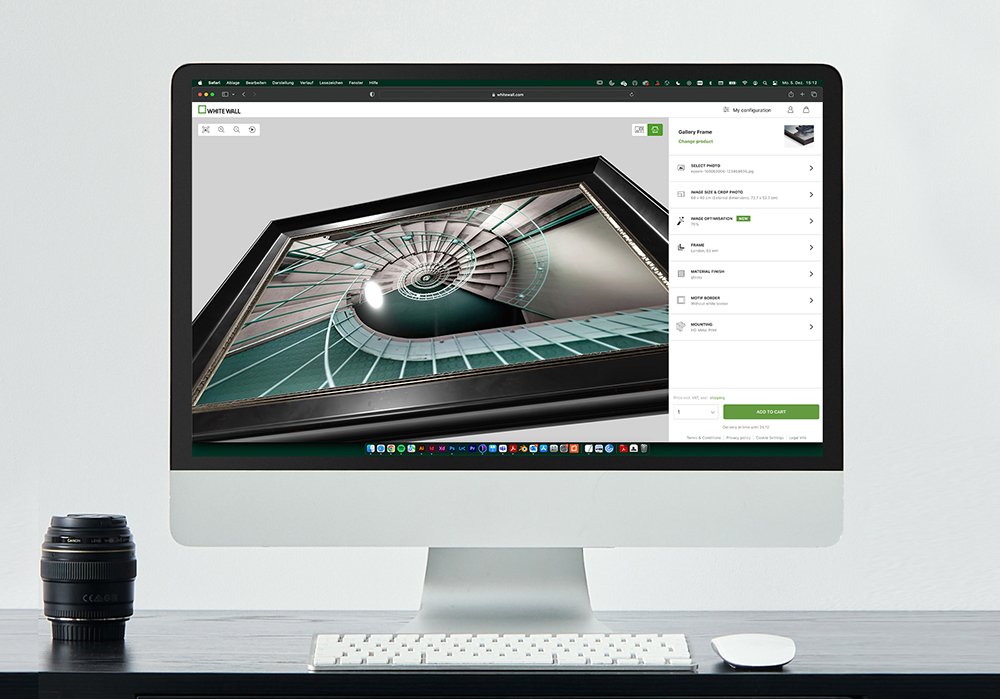
The update to the wall art configurator, among other things, introduces a more user-friendly design process, a more detailed rendering of the work, a new image optimisation tool and an easy way to switch between the room view and the “free rotation”. Realistic reflections on the surfaces of the products and frames can also be better assessed in advance, allowing the best possible product to be selected.
“I am absolutely thrilled with the new WhiteWall wall art configurator. We are constantly hard at work with our team of experts on achieving the best possible digital visualization of our products in order to always produce the perfect results for our customers. After winning the TIPA World Award for the configurator in 2021, we are reaching the next level with our new version of the wall art configurator, offering the best support for professional as well as private use,” said Alexander Nieswandt, Founder and CEO of WhiteWall.
Detailed realisation – 3D scenery
In every step of the customized configuration, it is the small details that matter the most, and which in the end lead to perfect final results. For this purpose, our new wall art configurator uses a real 3D scene, where the texture and properties of the selected materials are represented realistically. The behaviour in the light and the reflections are rendered in real-time, which can be observed best when freely rotating the image. In combination with the zoom function, the user is able to admire even the fine textures of the wooden frames. Because all the material layers are included in the model, it is even possible to view the exact composition of the product with all the layers in a cross-section. Using this feature, it is possible to gain a much better impression of the material composition of the mounting as well as the subtle nuances of our frame selection.

360-degree rotation included
Once all of the desired product properties are selected, the completed work can be viewed and checked either as a representation in the “WhiteWall room” or under the “Free rotation” option. When the work is presented in the room, the image is simulated on the wall, offering a true-to-life simulation. With both options, there is the possibility of looking at the back of the work including the wall mount, which is especially exciting when it comes to hanging the picture later on. After that, the configuration can be completed and the image can be ordered.

On request: automatic image optimisation
Intelligent image correction is trained for AI-based professional photo editing. Functions such as automatically adjusting skin tones to the given lighting conditions, breathtaking colour brilliance thanks to compelling colour tone correction, and application-oriented exposure correction are just a few of the features well worth mentioning. Image optimisation is always set by default after the image is uploaded, but it can also be turned off at any time. The highlight, however, is that the desired level of optimisation can be determined individually. The effect can then be seen directly based on a before and after comparison. Depending on the project, the subject and the level of knowledge, the tool can be set to the desired level of optimization using a slider.
“With our new wall art configurator, we are once again demonstrating that we are not only one of the best photo labs, but that we also understand that factors such as user-friendliness are a key concern. With the new configurator, we are offering our customers a service that ties in nicely with the quality of our products.” Thomas Alscheid, Managing Director of WhiteWall.
For more information and to test the improved wall art configurator, visit the WhiteWall website.
[ad_2]
Source link